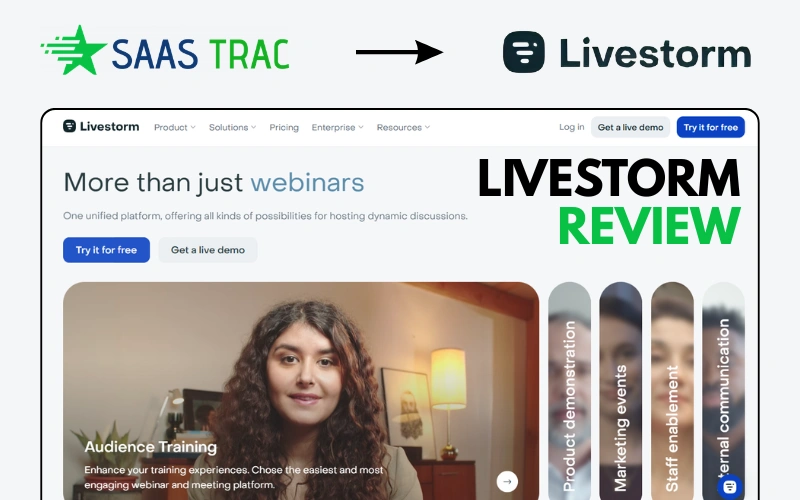
If you have ever hosted a webinar and spent the first 10 minutes troubleshooting someone’s missing plugin, you already understand the problem Livestorm was built to solve. Launched in 2016, Livestorm is a fully browser-based video engagement platform that lets you host live webinars, virtual events, online meetings, and on-demand sessions, all without asking attendees to download a single thing.
Livestorm positions itself not just as a webinar tool, but as a complete video engagement platform. That means it handles the entire event lifecycle: registration pages, automated email reminders, live interaction tools, recording, on-demand replays, and post-event analytics, all under one roof.
Who Should Use Livestorm?
Livestorm is particularly well-suited for:
- B2B SaaS companies running product demos, customer training, and lead-gen webinars
- Marketing teams that need a polished, brand-consistent webinar experience
- Educators and coaches delivering online workshops or courses
- Enterprise teams hosting internal all-hands, onboarding sessions, and training
- Customer success teams running onboarding webinars and renewal demos
Browser-Based Webinar Software Explained
Unlike Zoom, GoTo Webinar, or older platforms that require downloaded desktop applications, Livestorm runs entirely in the browser. Attendees click a link and join, no plugins, no apps, no friction. This single feature dramatically increases attendance rates and reduces no-shows caused by technical barriers.
Why Livestorm Is Different From Traditional Tools
Traditional webinar platforms were built around desktop software. Livestorm was built for the cloud era from day one. The result is a platform that feels modern, loads fast, and works consistently across devices, whether your attendees are on a MacBook, a Windows laptop, or a mobile phone.
Livestorm Review (2026): Quick Summary
Livestorm is one of the best webinar platforms available in 2026 for B2B teams, marketers, and SaaS companies that prioritize a polished, friction-free attendee experience. It’s not the cheapest option, and it’s not infinitely customizable, but for teams that need reliability, professional branding, and tight CRM integrations without engineering overhead, it delivers.
| Category | Rating | Notes |
|---|---|---|
| Ease of Use | ★★★★★ 5/5 | Intuitive setup, clean UI |
| Features | ★★★★☆ 4/5 | Comprehensive but missing AI tools |
| Pricing | ★★★☆☆ 3/5 | Scales quickly; contact-based model |
| Integrations | ★★★★☆ 4/5 | Strong CRM/marketing connections |
| Support | ★★★★☆ 4/5 | Responsive team, good docs |
| Overall | ★★★★☆ 4/5 | Top-tier for B2B webinars |
Best for: Marketing teams, SaaS companies, educators, and customer success teams.
May not suit: Bootstrapped startups on tight budgets, or teams needing heavy customization.
Key Features of Livestorm (Why It Stands Out)
Livestorm’s feature set is built around one idea: make every step of the webinar experience seamless, for hosts and attendees alike. Here’s what makes it stand out.
Browser-Based Webinar Platform (No Downloads Required)
This is Livestorm’s most defining feature. Every session runs entirely in-browser. Attendees get a link, click it, and they’re in. No “Please install the Livestorm app.” No “Your browser doesn’t support this.” No support emails before the event even starts.
This matters more than it sounds. Research consistently shows that friction at the join step is one of the biggest drivers of webinar drop-off. By eliminating the download requirement, Livestorm meaningfully improves attendance rates compared to traditional desktop-app platforms.
Live, On-Demand & Automated Webinars
Livestorm supports three core session types, giving teams maximum flexibility:
- Live webinars: Real-time sessions with host-attendee interaction, Q&A, polls, and chat
- On-demand webinars: Pre-recorded sessions that attendees can watch at any time after registering
- Automated webinars: Schedule pre-recorded sessions to run at set times, simulating a live experience without requiring host presence
The ability to run automated webinars is particularly valuable for lead generation and product education. Your content keeps working 24/7 without needing someone on standby.
Audience Engagement Tools (Polls, Q&A, Chat)
Engagement during webinars is what separates an educational session from a forgettable broadcast. Livestorm includes:
- Live polls: Launch polls during sessions and display results in real time
- Q&A module: Attendees submit questions, which can be upvoted by others, prioritizing the most relevant topics
- Live chat: Public chat for real-time discussion throughout the session
- Emoji reactions: Lightweight interaction that keeps energy up during longer sessions
- Hand-raising: Attendees can signal they want to speak or ask a question
These tools are built in and intuitive; no third-party integrations required to enable basic interactivity.
CRM & Marketing Integrations
For B2B teams, Livestorm’s integration ecosystem is one of its strongest selling points. Native integrations include:
- HubSpot: Sync registrants and attendees as contacts automatically, without CSV exports
- Salesforce: Push leads directly into your CRM pipelines
- Pardot: Sync webinar data for marketing automation workflows
- Marketo, ActiveCampaign, Mailchimp: Email marketing sync
- Zapier: Connect Livestorm to 5,000+ apps via no-code automation
- Slack: Get event notifications and updates in your team channels
Analytics & Reporting Dashboard
Post-event analytics in Livestorm give you a clear picture of audience behavior. You can track:
- Attendance rate (registered vs. joined)
- Time-in-session (how long each attendee stayed)
- Engagement scores (based on poll participation, chat activity, etc.)
- Drop-off points in recordings
- Replay views for on-demand content
The engagement scoring is particularly useful for sales and customer success teams. You can immediately identify your most engaged leads for follow-up.
Team Collaboration & Moderation Tools
Livestorm supports multiple team roles to keep events running smoothly:
- Host: Full control over the session
- Co-host/Moderator: Can manage Q&A, mute attendees, and share screens without full host access
- Guest speakers: Invite up to 16 simultaneous live speakers on paid plans
- Team workspaces: Multiple team members can manage events, view analytics, and access recordings
Explore Reviews
DreamHost vs. GreenGeeks for Eco-Friendly Performance Hosting in 2026
WordPress vs Webflow: Choosing The Right Platform For SaaS Growth
Livestorm Pricing (Plans Explained for 2026)
Livestorm uses a contact-based pricing model, meaning you pay based on the number of active contacts, people who register for or attend your events, rather than a flat per-seat or per-host fee. This model can be cost-effective for small teams with predictable webinar volumes, but can scale quickly for high-traffic events.
Free Plan Overview
Livestorm’s free plan offers full access to core features with meaningful limitations:
- Unlimited webinars and instant meetings
- Up to 10 attendees per live webinar
- 20-minute maximum session duration
- 4-person capacity for instant meetings
- Custom branding and analytics included
The free plan is ideal for testing the platform internally before committing. It is not practical for customer-facing live events due to attendee and time caps.
Pro & Business Plans
Livestorm’s Premium plan starts at approximately $99/month (billed monthly) or around $76/month billed annually, covering up to 100 attendees per session. Annual billing typically reduces costs by 20–30% compared to monthly billing.
Key Premium plan features include:
- Up to 100 attendees (expandable with add-ons)
- 4-hour maximum session duration
- Unlimited event registrations
- Up to 16 live speakers per session
- Full CRM and marketing integrations
- Standard support
The Enterprise plan scales up to 3,000 live attendees, includes up to 12 hours per session, VIP support with SLAs, a dedicated Customer Success Manager, SAML SSO, and custom pricing negotiated with the Livestorm sales team.
Pricing Comparison Table
| Plan | Price (Monthly) | Attendees | Session Length | Best For |
|---|---|---|---|---|
| Free | $0 | Up to 10 | 20 minutes | Testing & internal use |
| Premium | ~$99/mo (or ~$76/mo annual) | Up to 100 | 4 hours | SMBs & growing teams |
| Business Add-ons | +$99 (250 seats) / +$209 (1,000 seats) | Up to 1,000+ | 4+ hours | Scaling marketing teams |
| Enterprise | Custom pricing | Up to 3,000+ | Up to 12 hours | Large enterprises |
Is Livestorm Worth the Price?
For B2B marketing teams and SaaS companies running regular webinars, yes, Livestorm’s pricing is competitive with platforms like Demio and ON24 when you factor in the full feature set. The browser-based experience, built-in email automation, CRM integrations, and reliable uptime justify the cost for teams where webinars are a meaningful revenue channel.
For small businesses, nonprofits, or teams running occasional one-off events, the contact-based pricing model can feel steep. At scale, adding extra attendee capacity through paid add-ons can make total costs unpredictable. If budget is the primary constraint, explore the free plan first and evaluate whether the Premium tier’s ROI justifies the spend.
Livestorm Pros and Cons
| ✅ Pros | ❌ Cons |
|---|---|
| No downloads required for attendees | Contact-based pricing scales quickly for high-volume events |
| Fully browser-based across all devices | Limited customization options compared to some competitors |
| Clean, modern UI that’s easy to learn | Free plan too restricted for real-world use |
| Strong CRM & marketing integrations | No built-in AI content or meeting summary tools |
| Supports live, on-demand, and automated webinars | Internet-dependent, no offline fallback |
| Detailed engagement analytics | Add-on costs for higher attendee capacity can add up |
| Up to 16 live speakers per session | Analytics depth lags behind some enterprise alternatives |
| Reliable uptime and stable performance |
Livestorm Use Cases (Who Should Use It?)
Webinars & Lead Generation
This is Livestorm’s sweet spot. B2B marketers use Livestorm to host thought leadership webinars, product education sessions, and partner events that generate qualified leads. The combination of branded registration pages, automated email reminders, and post-event CRM sync makes the entire funnel manageable without additional tooling.
The on-demand and automated webinar modes extend the reach of each session beyond the live date, turning a single recording into an evergreen lead-generation asset.
Product Demos & Sales Calls
Sales teams use Livestorm for one-to-many product demos and personalized discovery calls. The screen-sharing tools, in-session Q&A, and post-session engagement data help sales reps identify hot leads and prioritize follow-up based on attendee behavior rather than guesswork.
Online Events & Workshops
Livestorm handles multi-session virtual events, workshops, and online summits. The multi-session registration feature lets attendees register once and join multiple sessions, reducing friction for multi-day events. Companies also use Livestorm for partner webinars, industry panels, and virtual conference tracks.
Internal Team Meetings
Beyond external events, Livestorm works well for internal company communications, all-hands meetings, team training, onboarding sessions, and HR briefings. With no download required, employees on any device or OS can join without IT assistance.
Livestorm vs Other Virtual Meeting Platforms
Livestorm vs Zoom
Zoom is primarily a video conferencing tool that has expanded into webinars. Livestorm is purpose-built for structured webinar experiences with a defined audience journey. Key differences:
- Livestorm requires no downloads; Zoom typically requires the Zoom app for the best experience
- Livestorm includes built-in registration pages, email automation, and lead scoring; Zoom requires third-party tools for these
- Zoom has a much larger user base and is more widely recognized by attendees
- Zoom’s webinar pricing starts higher, but includes more meeting features bundled together
Verdict: Choose Zoom if your team primarily needs video conferencing with occasional webinars. Choose Livestorm if webinars and virtual events are a core part of your marketing or customer success strategy.
Livestorm vs Demio
Demio is Livestorm’s closest direct competitor; both are modern, browser-based webinar platforms built for marketers. The differences are subtle:
- Demio has a simpler pricing structure (seat-based rather than contact-based)
- Livestorm offers stronger CRM integrations and more granular analytics
- Demio is slightly more affordable at lower tiers; Livestorm offers more at scale
- Both support live, on-demand, and automated webinars
Verdict: For teams heavily invested in HubSpot or Salesforce, Livestorm’s native integrations give it an edge. For simpler setups on a tighter budget, Demio is worth considering.
Livestorm vs WebinarJam
WebinarJam is a well-established webinar platform popular with online marketers, course creators, and coaches. Compared to Livestorm:
- WebinarJam supports larger audiences at lower price points
- Livestorm has a cleaner UI and better enterprise-grade integrations
- WebinarJam is better suited for high-volume consumer webinars; Livestorm is optimized for B2B use cases
- Livestorm’s browser-based experience is smoother than WebinarJam’s hybrid approach
Verdict: For B2B SaaS and marketing teams, Livestorm wins on integrations and professionalism. For consumer-facing webinars at scale on a budget, WebinarJam offers better value.
| Feature | Livestorm | Zoom Webinars | Demio | WebinarJam |
|---|---|---|---|---|
| Browser-based (no download) | ✅ Yes | ❌ No | ✅ Yes | ⚠️ Partial |
| Live + Automated Webinars | ✅ Yes | ⚠️ Limited | ✅ Yes | ✅ Yes |
| CRM Integrations | ✅ Strong | ✅ Good | ⚠️ Basic | ⚠️ Limited |
| Free Plan | ✅ Yes (limited) | ❌ No | ❌ No | ❌ No |
| Max Attendees | 3,000+ | 50,000+ | 1,000 | 5,000 |
| Starting Price | ~$99/mo | $500+/mo (webinars) | ~$49/mo | ~$39/mo |
| Best For | B2B Marketing | Large Scale | Simplicity | Consumer Sales |
How to Use Livestorm (Step-by-Step Guide)
Setting up a webinar on Livestorm is designed to take under 30 minutes. Here’s the complete process:
Step 1: Create Your Livestorm Account
Go to livestorm.co and sign up. The free plan requires no credit card. You’ll be walked through a brief onboarding flow to configure your workspace name and branding. Team members can be added immediately from the team settings panel.
Step 2: Create Your First Event
From the dashboard, click “New Event” and select your session type: Live Webinar, On-Demand, or Automated. Name your event, set the date and time, and configure the duration. You can also set a registration limit to create scarcity and boost sign-up urgency.
Step 3: Customize Your Registration Page
Livestorm provides a built-in registration page builder. You can add your logo, custom colors, a session description, speaker profiles, and even embedded videos or images to increase conversions. Custom registration fields let you collect additional data from registrants (company size, role, use case, etc.).
Step 4: Set Up Email Automation
Configure your email cadence: confirmation emails, reminders (24 hours, 1 hour, 15 minutes before), and post-event follow-ups. Templates are provided, but you can customize with HTML for full brand control. Calendar invites are sent automatically to registrants.
Step 5: Invite Attendees
Share the registration link via email, social media, your website, or a company page widget. You can also embed the registration form directly on your own website using Livestorm’s widget code.
Step 6: Run Your Live Session
On the day of your event, join the session from the Livestorm dashboard. Launch polls, respond to Q&A, use screen sharing, and manage speakers from the host control panel. Sessions are recorded automatically if you have recording enabled on your plan.
Step 7: Track Performance
After the event, the analytics dashboard shows attendance rate, average time-in-session, engagement scores, individual attendee behavior, and replay view counts. Export this data or push it directly to your CRM via native integrations for immediate follow-up workflows.
Is Livestorm the Best Virtual Meeting Platform in 2026?
For a specific kind of user, the B2B marketer, SaaS customer success team, or professional educator who runs structured, branded virtual events regularly, Livestorm is genuinely one of the best tools available in 2026. Its browser-based architecture, polished UX, and deep CRM integrations are consistently best-in-class.
However, “best” depends heavily on your use case:
- Best browser-based webinar experience: Livestorm wins
- Best for large-scale consumer webinars on a budget: WebinarJam or GoTo Webinar may be better
- Best for teams already deep in the Zoom ecosystem: Zoom Webinars is more integrated
- Best for simplicity on a smaller budget: Demio is worth evaluating
When to choose an alternative: If you need advanced AI-generated meeting summaries, unlimited white-label branding, or enterprise-grade telephony features, Livestorm may not be the right fit. The platform is strong but not exhaustive.
Final Verdict: Should You Choose Livestorm?
After reviewing Livestorm’s features, pricing, user feedback, and competitive positioning in 2026, here’s the bottom line:
Who Livestorm Is Perfect For
- B2B SaaS companies running product demos, onboarding webinars, and marketing events
- Marketing teams that need clean registration flows, email automation, and CRM sync without extra tools
- Customer success teams using webinars for onboarding and retention
- Educators and trainers who want a professional, branded event experience
- Companies where attendee experience (no downloads, clean UI) is a priority
Who Should Consider Alternatives
- Solo creators or small teams on tight budgets who host events occasionally
- Organizations needing heavy customization or white-label options at low price points
- Teams primarily need video conferencing, not structured webinars
- High-volume consumer webinar hosts where cost-per-attendee is the primary metric
Final Rating: 4/5. Livestorm is a polished, reliable, and feature-rich webinar platform that earns its place in the toolkit of any team serious about virtual events. The pricing model can be a friction point at scale, but for the right use case, the ROI is clear.
FAQs About Livestorm
What is Livestorm used for?
Livestorm is used for hosting live webinars, automated webinars, on-demand video sessions, virtual events, online workshops, product demos, and internal team meetings. It manages the full event lifecycle, including registration, email reminders, live engagement, recording, and post-event analytics.
Is Livestorm free?
Yes, Livestorm has a permanently free plan. It includes full access to core features, but limits live webinars to 10 attendees and 20-minute sessions. The free plan is useful for testing the platform, but not practical for real customer-facing events.
How much does Livestorm cost?
Livestorm’s Premium plan starts at approximately $99/month (billed monthly) or around $76/month with annual billing, covering up to 100 attendees per session. Additional attendee capacity can be added via paid add-ons. Enterprise pricing is custom and negotiated directly with the Livestorm sales team.
Is Livestorm better than Zoom?
It depends on your use case. Livestorm is purpose-built for webinars and structured virtual events, with better registration tools, email automation, and lead scoring built in. Zoom is a stronger general-purpose video conferencing platform that scales to massive audiences. For dedicated webinar use cases, most B2B marketers find Livestorm’s purpose-built features more effective.
Is Livestorm good for webinars?
Yes, Livestorm is widely regarded as one of the best dedicated webinar platforms available in 2026, particularly for B2B use cases. Its browser-based access, engagement tools, CRM integrations, and analytics make it a strong choice for teams that run webinars as a core part of their marketing or customer success strategy.
Does Livestorm require a download?
No. Livestorm is fully browser-based. Attendees join webinars and meetings by clicking a link; no app, plugin, or extension is required. This works on desktop and mobile browsers, making it accessible to virtually any attendee regardless of their device or IT permissions.
Last updated: April 2026. Pricing and features are subject to change. Always verify current plans at livestorm.co.